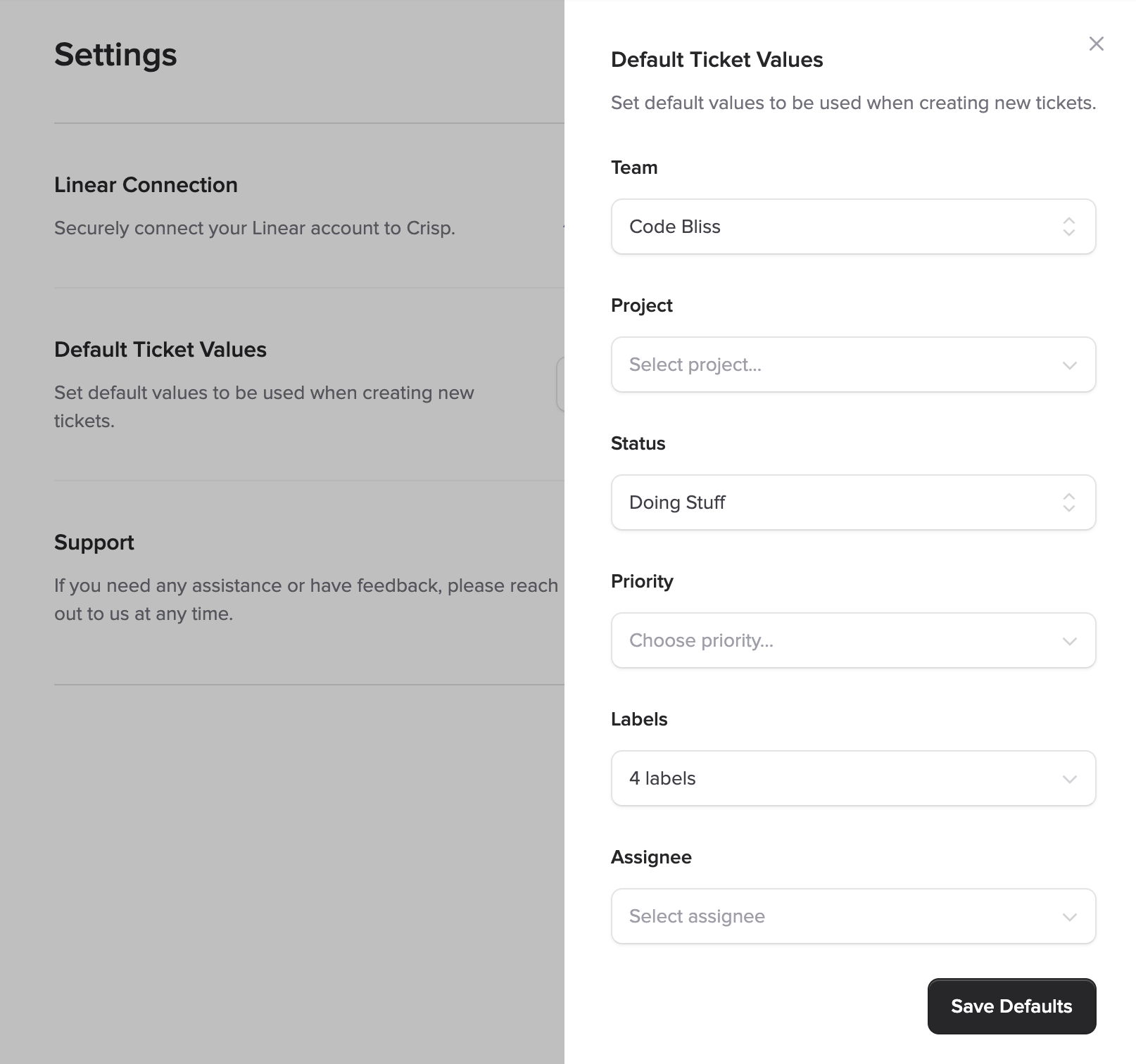
We're excited to announce a powerful new feature that streamlines your ticket creation workflow. You can now configure default values for teams, projects, states, priorities, labels, and assignees. Save time and ensure consistency across all tickets created from Crisp conversations.
What's new
Configure default values for new Linear tickets directly from your Crisp settings. Once configured, every new ticket created from a Crisp conversation will automatically populate with your chosen defaults:
- Default Team - Automatically assign tickets to a specific Linear team (e.g. Support, Engineering, etc.).
- Default Project - Route tickets to a specific Linear project.
- Default State - Set the initial status (e.g., "Backlog", "Triage", "To Do")
- Default Priority - Pre-select priority levels from Urgent to No Priority
- Default Labels - Automatically tag tickets with relevant labels
- Default Assignee - Route tickets directly to the right team member
Why this matters
Before this feature, support teams had to manually select teams, projects, states, priorities, and labels for every single ticket they created from Crisp conversations. This was repetitive, time-consuming, and prone to inconsistency.
Now, with default ticket configuration, you can set it once and forget it. Your team saves valuable time on every ticket creation, and you maintain consistency across your support workflow. Whether you're handling 10 or 100 customer conversations a day, this feature scales with your needs.
How to use it
Setting up default ticket values takes just a few seconds:
- Open the Ticket Manager settings in Crisp
- Click the "Configure Defaults" button
- Select your preferred default values for teams, projects, states, priorities, labels, and assignees
- Click "Save Defaults"
From that moment forward, every new ticket you create will automatically use these defaults. You can always override them on a case-by-case basis when creating individual tickets, giving you both efficiency and flexibility.
Pro Tip
If your team handles different types of customer issues (bugs vs. feature requests, for example), you can adjust your defaults periodically to match your current priorities. The configuration is flexible and can be changed anytime.
Use cases
Here are some common scenarios where default ticket configuration shines:
Support Team Workflow
Set default team to "Support", default state to "Triage", and default label to "customer-reported". Every incoming customer issue is automatically categorized and ready for your team to review.
Bug Tracking
Configure default priority to "High", default label to "bug", and default project to your current release cycle. Critical bugs get immediate attention with consistent tracking.
Enterprise Customer Routing
Set default assignee to your senior support engineer and default priority to "Urgent" for VIP customer conversations. Enterprise issues go straight to the right person.
Available in all languages
This feature is fully localized and available in all languages supported by Ticket Manager:
- 🇩🇰 Danish
- 🇳🇱 Dutch
- 🇬🇧 English
- 🇫🇷 French
- 🇩🇪 German
- 🇮🇹 Italian
- 🇵🇹 Portuguese
- 🇪🇸 Spanish
- 🇹🇷 Turkish
What's next
We're continuously improving Ticket Manager based on your feedback. Upcoming features include team-specific default configurations, time-based automation rules, and enhanced bulk ticket management.
Have suggestions or questions? Use the Crisp widget on this page to reach out to our team. We'd love to hear from you!